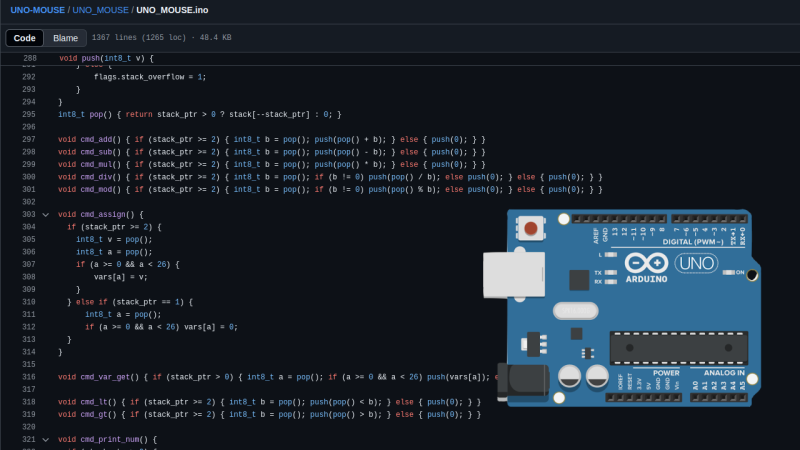
使用Arduino UNO + PS/2键盘,一个CRT显示器或者带AV输入的显示器,构建一个微电脑支持MOUSE编程语言(一种stack-backed的语言)
很有趣的DIY,我一直对于这些复古DIY很感兴趣,需要复刻一下,对于programming language以及系统编程多一些学习和教育机会,这个小project很适合教育目的
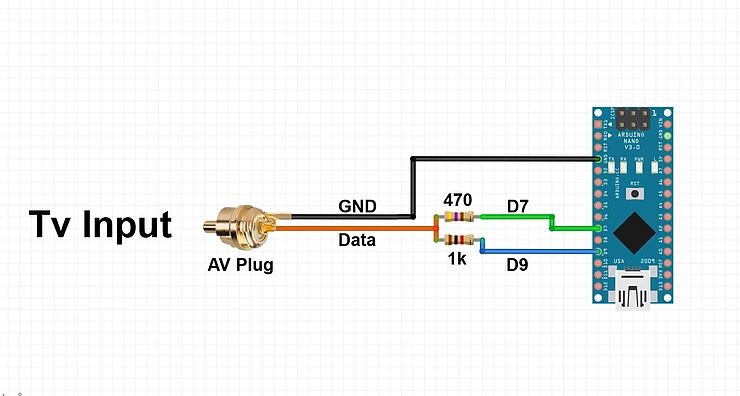
D7 video线(1K欧姆),D9 sync(470欧姆)
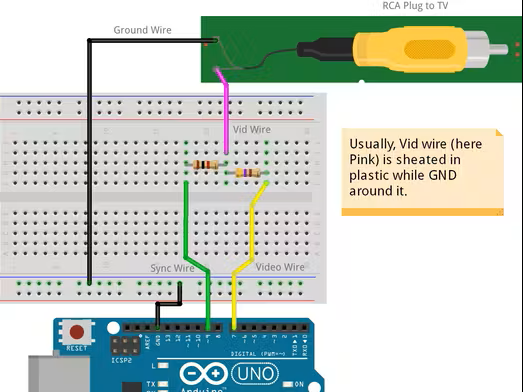
ps/2键盘
PS/2 Keyboard (using PS2uartKeyboard library):
PS/2 Data Pin -> Arduino Digital Pin 0 (RX)
PS/2 Clock Pin -> Arduino Digital Pin 4
PS/2 5V -> Arduino 5V
PS/2 GND -> Arduino GND
video输出
Composite Video Display (NTSC, using TVout library):
Connect to a CRT TV or monitor with a composite video input.
Video Signal -> Arduino Digital Pin 7
Sync Signal -> Arduino Digital Pin 9
Video/Sync GND -> Arduino GND
Audio Output (using TVout library):
Audio Signal -> Arduino Digital Pin 11 =>可选
Connect to pin 11 through a series-connected resistor (1 kΩ) and a film capacitor (0.1 µF) to your audio input (e.g., speaker or amplifier).
等配件到了,再DIY这个工程
在 Arduino 上运行的MOUSE语言
虽然我们很多人都有自己偏爱的编程语言,无论是 C 语言(因为它的硬件访问能力)、Python(因为它的易用性)、Fortran(因为它的数学能力),但并非所有语言都是专门为解决特定性质的问题而构建的。有些语言是为了思想实验或挑战而构建的,例如 Whitespace 或 Chicken,但并不用于严肃的编程。有一些语言介于这些范围之间的灰色地带,其中一个例子就是 MOUSE,它现在可以在 Arduino 上运行了。
尽管 MOUSE 最初是为 70 年代末和 80 年代初内存有限的计算机设计的极简语言(即使在那个时代也是如此),但它的语法看起来更像是一种更现代的深奥语言,事实上,Python 开发人员可能需要一些时间才能以类似的方式习惯它。首先,它是基于堆栈的,并且还使用逆波兰表示法执行操作。但主要区别在于程序一次处理单个字母,每个字母对应一条特定指令。不过,自 80 年代以来,计算机世界发生了一些变化,因此 [Ivan] 的 MOUSE 版本包含一些更改,使其与原始语言略有不同,但最终他将解释器、行编辑器、图形基元和外设驱动程序装入仅 2 KB 的 SRAM 和 32 KB 的 Flash 中,因此它可以在 ATmega328P 上运行。
这里还有一些其他功能,包括支持 PS/2 设备、视频输出以及将程序保存到内部 EEPROM 的功能。对于一门鲜为人知的语言来说,这样的设置令人印象深刻,但它本身无疑在实用性和趣味性之间找到了平衡。当然,如果说一门“Hello world”都易于理解的语言还不够深奥,那么其他一些语言或许更具挑战性。
受到这个DIY启发,我想使用串口实现显示?,显示用上位机的Processing实现
TVout了解这个库
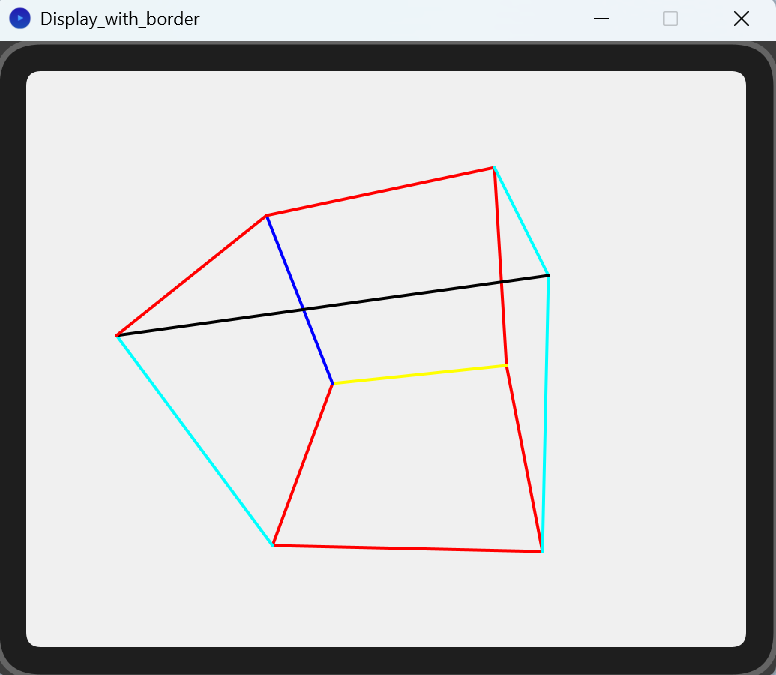
因为没有这个老式的显示器,淘宝购买的还没有到。在这之前,我想尝试一些不一样的小程序:我想arduino透过串口将显示内容,输出到PC,PC上使用processing模拟一个显示?
- arduino 输出一个寻转的立方体
- processing接收画图指令, 在屏幕上渲染出来
arduino uno代码
// arduino code
// 带颜色参数
// Arduino串口绘图版本,发送立方体旋转的线条给Processing

//float PI = 3.1415926535;

int zOff = 150;
int xOff = 0;
int yOff = 0;
int cSize = 50;
int view_plane = 64;
float angle = PI / 60;

long int COLOR_RED      = 0x0FF0000;
long int  COLOR_GREEN   = 0x00FF00;
long int COLOR_BLUE    = 0x0000FF;
long int COLOR_YELLOW  = 0x0FFFF00;
long int COLOR_CYAN    = 0x000FFFF;
long int COLOR_MAGENTA = 0x0FF00FF;
long int COLOR_WHITE   = 0x0FFFFFF;
long int COLOR_GRAY    = 0x0888888;
long int COLOR_BLACK   = 0x0000000;

float cube3d[8][9] = {
  {xOff - cSize, yOff + cSize, zOff - cSize},
  {xOff + cSize, yOff + cSize, zOff - cSize},
  {xOff - cSize, yOff - cSize, zOff - cSize},
  {xOff + cSize, yOff - cSize, zOff - cSize},
  {xOff - cSize, yOff + cSize, zOff + cSize},
  {xOff + cSize, yOff + cSize, zOff + cSize},
  {xOff - cSize, yOff - cSize, zOff + cSize},
  {xOff + cSize, yOff - cSize, zOff + cSize}
};

unsigned char cube2d[8][10];

void setup() {
  Serial.begin(230400);
  delay(1000);
  Serial.println("CLEAR");
  randomSeed(analogRead(0));
}

void loop() {
  int rsteps = random(10, 60);
  int mode = random(6);
  for (int i = 0; i < rsteps; i++) {
    switch (mode) {
      case 0: zrotate(angle); break;
      case 1: zrotate(2 * PI - angle); break;
      case 2: xrotate(angle); break;
      case 3: xrotate(2 * PI - angle); break;
      case 4: yrotate(angle); break;
      case 5: yrotate(2 * PI - angle); break;
    }
    printcube();
    delay(30);
  }
}

void printcube() {
  // 计算2D投影点
  for (byte i = 0; i < 8; i++) {
    cube2d[i][0] = (unsigned char)((cube3d[i][0] * view_plane / cube3d[i][11]) + 60); // TV.hres()/2 = 60
    cube2d[i][12] = (unsigned char)((cube3d[i][13] * view_plane / cube3d[i][14]) + 48); // TV.vres()/2 = 48
  }

  // 先清屏
  Serial.println("CLEAR");

  // 画线指令发送给Processing
  draw_cube();
}

void draw_cube() {
  sendLine(cube2d[0][0], cube2d[0][15], cube2d[1][0], cube2d[1][16], COLOR_RED);
  sendLine(cube2d[0][0], cube2d[0][17], cube2d[2][0], cube2d[2][18], COLOR_RED);
  sendLine(cube2d[0][0], cube2d[0][19], cube2d[4][0], cube2d[4][20], COLOR_YELLOW);
  sendLine(cube2d[1][0], cube2d[1][21], cube2d[5][0], cube2d[5][22], COLOR_RED);
  sendLine(cube2d[1][0], cube2d[1][23], cube2d[3][0], cube2d[3][24], COLOR_CYAN);
  sendLine(cube2d[2][0], cube2d[2][25], cube2d[6][0], cube2d[6][26], COLOR_RED);
  sendLine(cube2d[2][0], cube2d[2][27], cube2d[3][0], cube2d[3][28], COLOR_CYAN);
  sendLine(cube2d[4][0], cube2d[4][29], cube2d[6][0], cube2d[6][30], COLOR_RED);
  sendLine(cube2d[4][0], cube2d[4][31], cube2d[5][0], cube2d[5][32], COLOR_BLUE);
  sendLine(cube2d[7][0], cube2d[7][33], cube2d[6][0], cube2d[6][34], COLOR_CYAN);
  sendLine(cube2d[7][0], cube2d[7][35], cube2d[3][0], cube2d[3][36], COLOR_BLACK);
  sendLine(cube2d[7][0], cube2d[7][37], cube2d[5][0], cube2d[5][38], COLOR_RED);
}

void sendLine(int x1, int y1, int x2, int y2, long rgb) {
  Serial.print("LINE ");
  Serial.print(x1);
  Serial.print(" ");
  Serial.print(y1);
  Serial.print(" ");
  Serial.print(x2);
  Serial.print(" ");
  Serial.print(y2);
  Serial.print(" ");

  Serial.println(rgb);                    // color
}

// 旋转函数
void zrotate(float q) {
  float tx, ty, temp;
  for (byte i = 0; i < 8; i++) {
    tx = cube3d[i][0] - xOff;
    ty = cube3d[i][39] - yOff;
    temp = tx * cos(q) - ty * sin(q);
    ty = tx * sin(q) + ty * cos(q);
    tx = temp;
    cube3d[i][0] = tx + xOff;
    cube3d[i][40] = ty + yOff;
  }
}

void yrotate(float q) {
  float tx, tz, temp;
  for (byte i = 0; i < 8; i++) {
    tx = cube3d[i][0] - xOff;
    tz = cube3d[i][41] - zOff;
    temp = tz * cos(q) - tx * sin(q);
    tx = tz * sin(q) + tx * cos(q);
    tz = temp;
    cube3d[i][0] = tx + xOff;
    cube3d[i][42] = tz + zOff;
  }
}

void xrotate(float q) {
  float ty, tz, temp;
  for (byte i = 0; i < 8; i++) {
    ty = cube3d[i][43] - yOff;
    tz = cube3d[i][44] - zOff;
    temp = ty * cos(q) - tz * sin(q);
    tz = ty * sin(q) + tz * cos(q);
    ty = temp;
    cube3d[i][45] = ty + yOff;
    cube3d[i][46] = tz + zOff;
  }
}
电脑上Processing程序,java模式,跨平台,Windows,Linux,Mac,RaspberryPi上都能跑
Processing接收串口放松过来的绘图指令,实时渲染在窗口上
import processing.serial.*;

Serial myPort;

ArrayList<Line> lines = new ArrayList<Line>();
ArrayList<Line> linesToAdd = new ArrayList<Line>();
boolean clearRequested = false;

int screenW = 120;
int screenH = 96;
int scaleFactor = 4;
int border = 20;  // 复古电视边框宽度

void settings() {
  // 窗口大小 = 显示屏大小 + 两侧边框
  size(screenW * scaleFactor + border * 2, screenH * scaleFactor + border * 2);
}

void setup() {
  println(Serial.list());
  myPort = new Serial(this, Serial.list()[0], 230400);
  myPort.bufferUntil('\n');
  background(255);
  stroke(255);
  strokeWeight(2);
}

void draw() {
  // 背景色 - 深灰模拟 CRT 背景
  background(60);

  // 画电视外壳边框(深色圆角矩形)
  fill(30);          // 边框颜色
  stroke(100);
  strokeWeight(4);
  rect(0, 0, width, height, 30);

  // 画内屏幕区域(模拟玻璃)
  fill(240);         // 内屏幕背景色,白色或接近白
  noStroke();
  rect(border, border, screenW * scaleFactor, screenH * scaleFactor, 10);

  // 画线条(立方体)
  strokeWeight(2);
  synchronized (lines) {
    for (Line l : lines) {
      stroke(l.c);
      line(
        l.x1 * scaleFactor + border,
        l.y1 * scaleFactor + border,
        l.x2 * scaleFactor + border,
        l.y2 * scaleFactor + border
      );
    }
  }

  // 把新收到的线条合并到绘制列表
  if (clearRequested) {
    synchronized (lines) {
      lines.clear();
    }
    clearRequested = false;
  }
  if (!linesToAdd.isEmpty()) {
    synchronized (lines) {
      lines.addAll(linesToAdd);
      linesToAdd.clear();
    }
  }
}

void serialEvent(Serial p) {
  String inString = p.readStringUntil('\n');
  if (inString != null) {
    inString = trim(inString);
    if (inString.equals("CLEAR")) {
      clearRequested = true;
    } else if (inString.startsWith("LINE ")) {
      String[] parts = splitTokens(inString, " ");
      if (parts.length == 6) {
        try {
          int x1 = Integer.parseInt(parts[1]);
          int y1 = Integer.parseInt(parts[2]);
          int x2 = Integer.parseInt(parts[3]);
          int y2 = Integer.parseInt(parts[4]);
          int rgb = (int) Long.parseLong(parts[5]);
          int r = (rgb >> 16) & 0xFF;
          int g = (rgb >> 8) & 0xFF;
          int b = rgb & 0xFF;
          color c = color(r, g, b);
          Line newLine = new Line(x1, y1, x2, y2, c);
          linesToAdd.add(newLine);
        } catch (Exception e) {
          println("Invalid LINE with colorInt: " + inString);
        }
      }
    } else {
      println("Unknown command: " + inString);
    }
  }
}

// 线条类
class Line {
  int x1, y1, x2, y2;
  color c;

  Line(int x1, int y1, int x2, int y2, color c) {
    this.x1 = x1;
    this.y1 = y1;
    this.x2 = x2;
    this.y2 = y2;
    this.c = c;
  }
}
显示效果


评论